Using Cosine Similarity for AI SEO: The Quick Start Guide


The Skinny: Cosine similarity is a data analysis technique that measures the semantic relationship between two “vectors”—numerical representations of text known as embeddings—to determine how closely related two pieces of content are. By calculating the angle between these vectors, search marketers can identify content clusters, find internal linking opportunities, and pinpoint irrelevant pages for pruning. In the era of AI-driven search, this method is essential for ensuring website content aligns with the “generative intent” of LLMs like ChatGPT and Gemini, increasing the likelihood that a brand is cited as a relevant answer.
Complex mathematical concepts have a way of rearing their head eventually, especially in a data-driven marketing industry. While cosine similarity has been used for years as a fairly niche traditional SEO tactic for large websites, the rise of large language models (LLMs) have brought this analytical technique to the forefront.
If you didn’t study data science in college, or decided to purge all your trigonometry knowledge from your mind to maintain your sanity, we got you covered. I’ll explain everything you need to know about cosine similarity for SEO and LLMs in plain language.
Cosine similarity is a data analysis technique that measures the similarity between two vectors, which are plotted as two lines that extend from the origin point on a plane (represented as 0,0). From there, we look at where those lines meet, and measure the angle between each of those points. The smaller the angle is, the more similar those terms are. If the angle is 90 degrees, the two concepts are completely unrelated. If it’s over 90 degrees, these concepts likely exist in opposition to each other.

Basically, platforms like Gemini or ChatGPT “read” your content by grabbing small chunks of your content, assigning a number value to the chunk it pulled, analyzing the overall context of your post, and then connecting all of those number values into a single line. Then, when someone asks it a question, it turns the question into several chunks and connects those number values into a single line. From there, it can search for information that matches their query by plotting both of those vectors, and choosing answers that are close together. From there, it generates an answer for the user.
Learn more about how search is evolving in our recent blog, The Future of SEO: 7 Predictions for 2026.
In the context of AI SEO, vector embeddings are a series of datapoints derived by an LLM analyzing your content or a prompt to understand its actual meaning in a numerical way. This can apply to text, graphs, visual elements, tokens, and more. For the purposes of this post, we’re talking about text embeddings specifically.
In the image above, A and B are each vector embeddings. These vectors form a single coordinate in the multidimensional “mind map” of concepts that the LLM is evaluating to form its answer. So, the LLM will group similar content based on the closeness of the embeddings, then use that information to inform its answer.
While we’re mentally back in the classroom, let’s define some of the common cosine-related terms you’ll see in this post and in programs that like Screaming Frog:
Now that we’ve established the key concepts, let’s focus on how it works, and how you can start applying it to your search campaigns.
Let’s see how this works for analyzing the similarity of a blog post to a potential customer’s prompt in ChatGPT. First, recognize that cosine similarity is measured using this formula:
SC(x, y) = x . y / ||x|| * ||y||
Think of “X” as your blog post’s vector values, and “Y” as the vector value of someone’s question. Basically, we’re trying to find the dot product of these two vectors (x . y), then using that to figure out which direction these arrows are pointing in. We then divide that number by the regular product, or overall length of two vectors, represented by ||x|| and ||y||. Looking at the overall length of the vector helps normalize the answers, otherwise the text length of a prompt or blog post could skew the results. The final result will be the cosine of the angle between each of these prompts, represented as a number between -1 and 1.
With that said, I wouldn’t go digging for your old graphing calculator just yet. After all, your X value is going to look something like this:
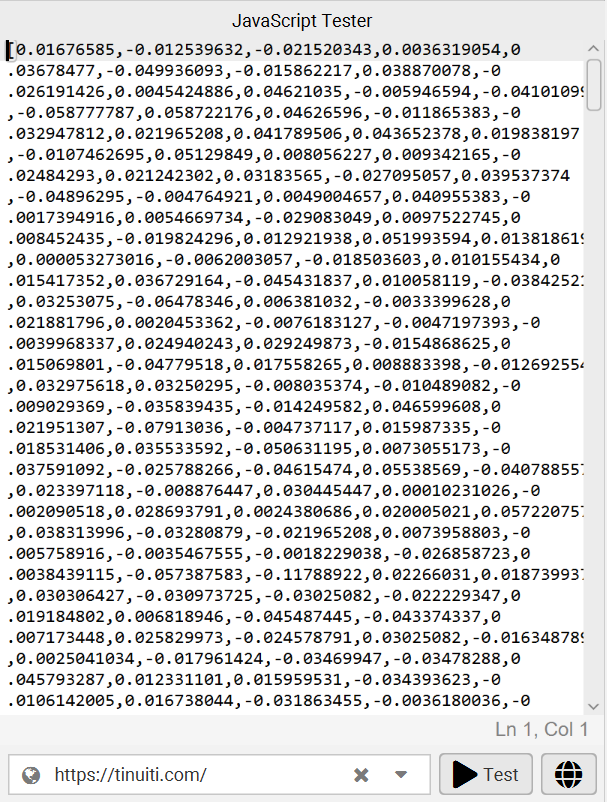
To bring it back home, LLMs turn words, phrases, and general concepts into a series of number values, called vector embeddings. That’s how they “read.” From there, we can put the numbers associated with a prompt and the numbers associated with your blog post into a cosine similarity formula, which will simplify this into a number between -1 and 1. Once you have that number, you can understand how relevant your content is to a user’s prompts.
When you run this through a program like Screaming Frog, it will simplify the output for you, turning those cosine values into a number ranging from 0 to 1. Anything greater than .90 is a near-exact match, a value of .90 to .60 is a close match, and anything under .60 is a poor match to the given term/phrase.
Have you ever wondered which dog breed is the most loyal? Or if cats and dogs are really all that different? We can solve that mystery with cosine analysis! Let’s use dogbreedinfo.com as a database. For my purposes, I’m going to crawl a small sample of random dog breed pages, along with each of the pages they link out to. We could crawl the entire site, but I’d like to keep this as quick as possible for the example’s sake.
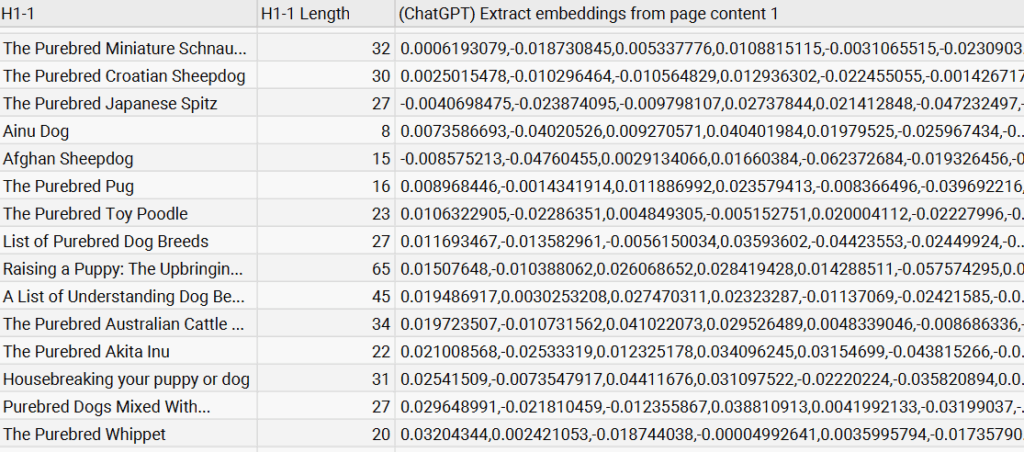
So, here’s a snippet of those pages I crawled with Screaming Frog, along with their embeddings. These numbers are pretty meaningless to us, but that’s how our computers like to talk to each other. Since we have these embeddings, we can use cosine similarity (and semantic search) to check how relevant each page is to a certain concept.
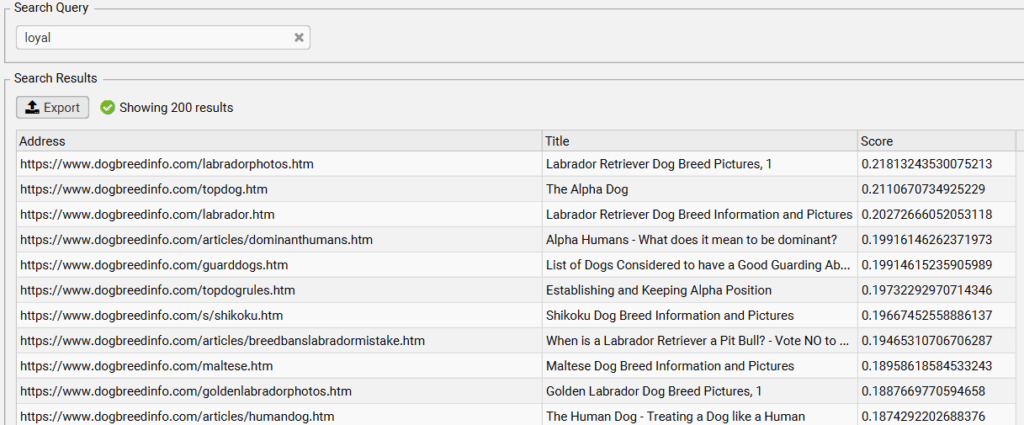
Most of us want a dog that’ll be loyal to us. If I really need my dog to be loyal, let’s see which dog breed pages are most semantically similar to the concept of loyalty. While none of these pages are an exact match, we see that the best match is a Labrador Retriever.
Just for fun, let’s see who is at the bottom of the loyalty list.
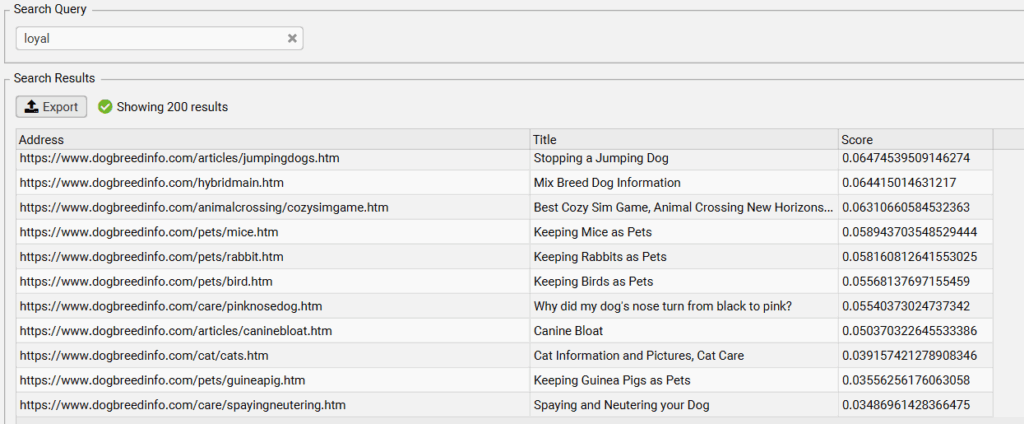
Third from the bottom, we have a page about cats. Which makes sense, because we associate cats with independence.
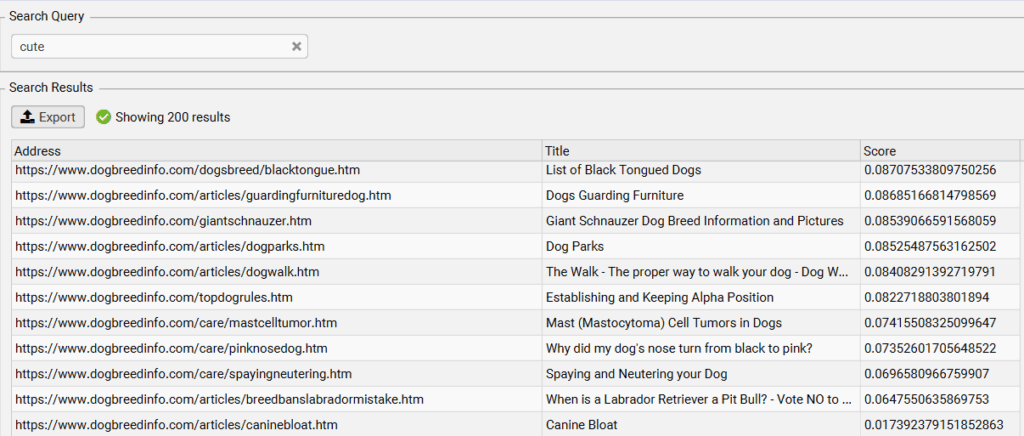
We can run this example again, trying to find the cutest dogs. So, let’s search for “cute.”

In this list, we see that Pugs, Toy Poodles, Yorkies, and Shiba Inus are all associated with “cuteness.” Then, at the bottom of the list we have giant dogs, medical issues, and training help. Intuitively, it’s easy to understand why these concepts might not be associated with cuteness.
Now, imagine how you could use this concept to understand how LLMs interpret your site content. If someone is using an LLM to search for concepts like “ad testing,” you can see if your “creative testing” blog post actually provides relevant information for that topic. If it doesn’t end up with a high score, that’s a post you need to refresh and optimize for relevance.
Cosine similarity is a fantastic way to create a highly scalable SEO strategy without necessarily needing to know the content of every page on the site. This can make technical and content optimizations much more straightforward. Here are a few ways you can start using it:
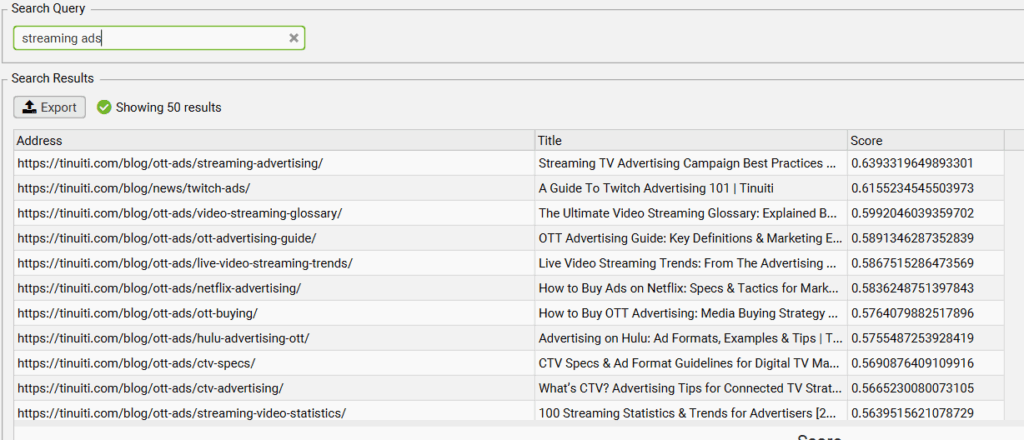
There’s a new adage you might have heard, that “Good AI SEO is just good SEO.” That’s mostly true – in the sense that if you’re trying to optimize for LLMs, you should use all the optimization tactics listed in the previous section. Ensuring your content is properly clustered helps you ensure LLMs are pulling the right information from your site, it reduces the chances of them looking at the wrong near-duplicate blog post, and can keep your site crisp and clean with sensible and scalable content pruning.
However, there are a few AI SEO specific best practices to follow. Try these tactics:
Although we like to think of numbers as neutral, all statistical methods will have a few flaws simply because they’re created by people. Here’s some that marketers might run into:
Word similarity – and deep statistical concepts like this – can deal with a lot of underpinning assumptions that may be debatable when we examine them closely. For example, the paper “Problems With Evaluation of Word Embeddings Using Word Similarity Tasks “ provides a series of flaws:
The word bank can either correspond to a financial institution or to the land near a river. However in WS-353, bank is given a similarity score of 8.5/10 to money, signifying that bank is a financial institution. Such an assumption of one sense per word is prevalent in many of the existing word similarity tasks, and it can incorrectly penalize a word vector model for capturing a specific sense of the word absent in the word similarity task.
While LLMs work around this bias by interpreting the overall context of a piece – they can understand you don’t put money in a “river’s bank” – this doesn’t always erase underlying bias from the frameworks they are built on. So, remember to use your brain to pick out nuances that machines could miss along the way.
All of those “chunks” that LLMs take out of your website are simplified into tokens. The longer the post, the more chunks you’ll get. If you are crawling your whole site using Screaming Frog, use the preview tool to make sure you don’t get an error like this:
“This model’s maximum context length is 8192 tokens. However, your messages resulted in 8298 tokens. Please reduce the length of the messages.”
If this happens, you’re not going to be able to grab the embeddings. Go ahead and set a crawl limit using your AI API functionality in Screaming Frog. I recommend starting with 7,500 characters or so, since you’ll get approximately 1,200 words from your page which is pretty representative of the typical blog post. You can shrink or expand as needed.
If you’re crawling over 500 pages, your work ThinkPad is probably going to struggle. It happened to me, anyway.
If you have memory problems, open Screaming Frog and go to File → Settings → Memory Allocation. Screaming Frog starts you off with a measly 2 GB so you can work while you run a crawl. You can crank that up significantly, so long as you leave an extra 2 GB on memory so your operating system doesn’t quit on you. Just be aware your computer might start struggling if you keep working, so you might want to schedule the crawl during your lunch break.
If you still have memory problems after trying this workaround, be sure to alert your IT team and then thank me later for your cool new PC.
This isn’t really a limit, but an important consideration nonetheless. While most programs like Screaming Frog will try to ignore navigation and footers, sometimes your site isn’t coded in a way that conveys these elements clearly to the crawler.
Configure your crawler and see how it renders the page to make sure you’re not capturing unnecessary information that can skew the output. For example, my first few attempts ended up only capturing our cookie consent banner. I had to find my own cookie and give it to Screaming Frog so it could read the page content.
Before we even open Screaming Frog, we need to get API access for the LLM of your choosing. Given the complexity of the average organization, this can be a small feat on its own. Follow this process for ChatGPT:
Once you add money, we can finally open ScreamingFrog.
Go to “Configuration” at the top of the window, then select “Crawl Config.” Click on Spider → Rendering. A window without much information will appear, and use the dropdown to select “Javascript.”

You’ll also need to store rendered HTML. Go to Spider → Extraction and scroll all the way to the bottom to check “Store Rendered HTML.”
If you’d like, you can return to the left panel again and go to Content → Content Area and exclude boilerplates and other irrelevant page content. This isn’t strictly necessary, but will make everything a little more accurate.
Now we’re all done with the spider configuration.
Now, go to API Access and connect your LLM of choice using the API key you generated at the start of this.

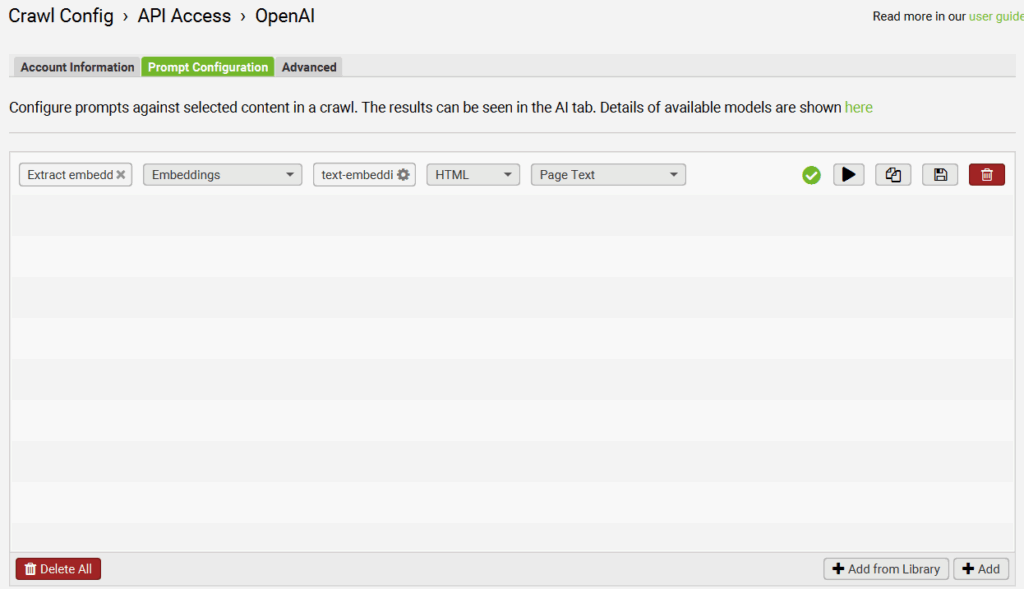
Click on the little gear and go to “Prompt Configuration.” Set it up to extract embeddings from page content using the “+ Add From Library” button. The default option that populates should work.
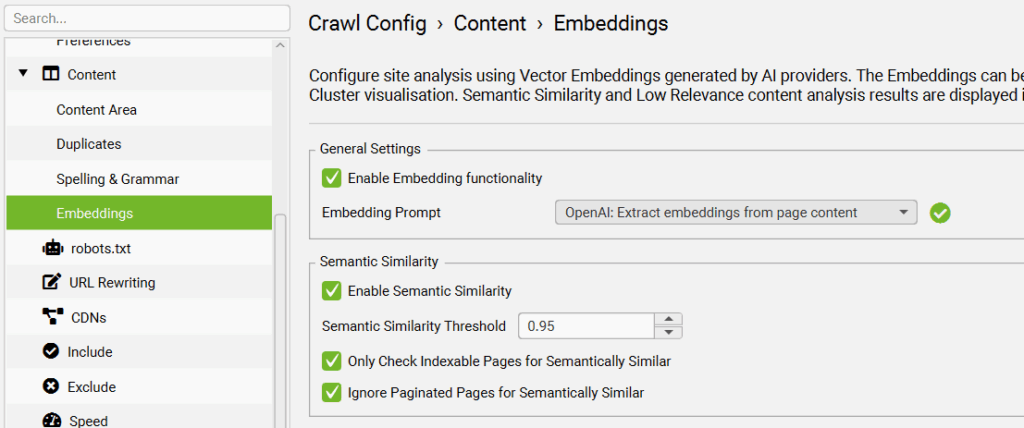
We’re going back to the left panel once again to select “Embeddings” under the “Content” dropdown. Check “Enable Embedding Functionality” and “Enable Semantic Similarity.”
We’re done! Go ahead and run your crawl. Once you’re done, you can use the Content Clustering map under the “Visualizations” map or the Semantic Search option in the righthand panel. For example, here’s how our content appears when we search for a basic Prime Day prompt:

In the realm of SEO, it’s crucial to determine how machines interpret your content — and this is especially true when optimizing for LLM-driven search. With cosine similarity, marketers can get an in-depth, measurable view of how their content relates to certain prompts and keywords. I hope this straightforward guide has given you everything you need to start using cosine similarity in your own content strategies.

Senior Specialist, Content Marketing
Liz Krupa is a Senior SEO Specialist at Tinuiti, where she drives B2B profitability through high-intent, educational content. She sits at the intersection of search engine optimization, content strategy, and marketing analytics to deliver full-funnel growth.
Get our Guide to AI in Search for the full playbook on what’s required to maintain visibility and build organic brand awareness.