ESP Migration: A Guide to Switching Email Platforms

The Skinny: Migrating to a new Email Service Provider (ESP) is a complex process that, if managed correctly, offers a strategic opportunity to eliminate technical debt and improve marketing efficiency. Successful transitions require a five-phase approach: rigorous pre-migration audits, data architecture planning, tech stack integration, and a careful IP warming strategy to protect deliverability.
Migrating technologies is never an easy transition, and an ESP (Email Service Provider) migration brings its own unique set of challenges. It can take longer than expected, cost more than expected, and cause more organizational headaches than expected.
However, if you fully prepare for an ESP migration and take special account of your marketing stack and related workflows, you can avoid many of the issues that seem endemic to the process. Not only that, your migration will present a strategic opportunity to find hidden efficiencies.
Want to ensure a successful, stress-free transition that maximizes the ROI of your new technology? Keep reading.
Knowing when it’s time to move on from your current system is key to understanding if an ESP migration will be worth the effort and investment. Most migrations are kicked off due to one of the following reasons:
Understanding the why behind your migration will help you evaluate your current needs and help determine your desired future state in a new technology partner.
At Tinuiti, we are constantly evaluating and assessing different ESP partners, and can assist in helping you find an email service provider that works best with your needs.
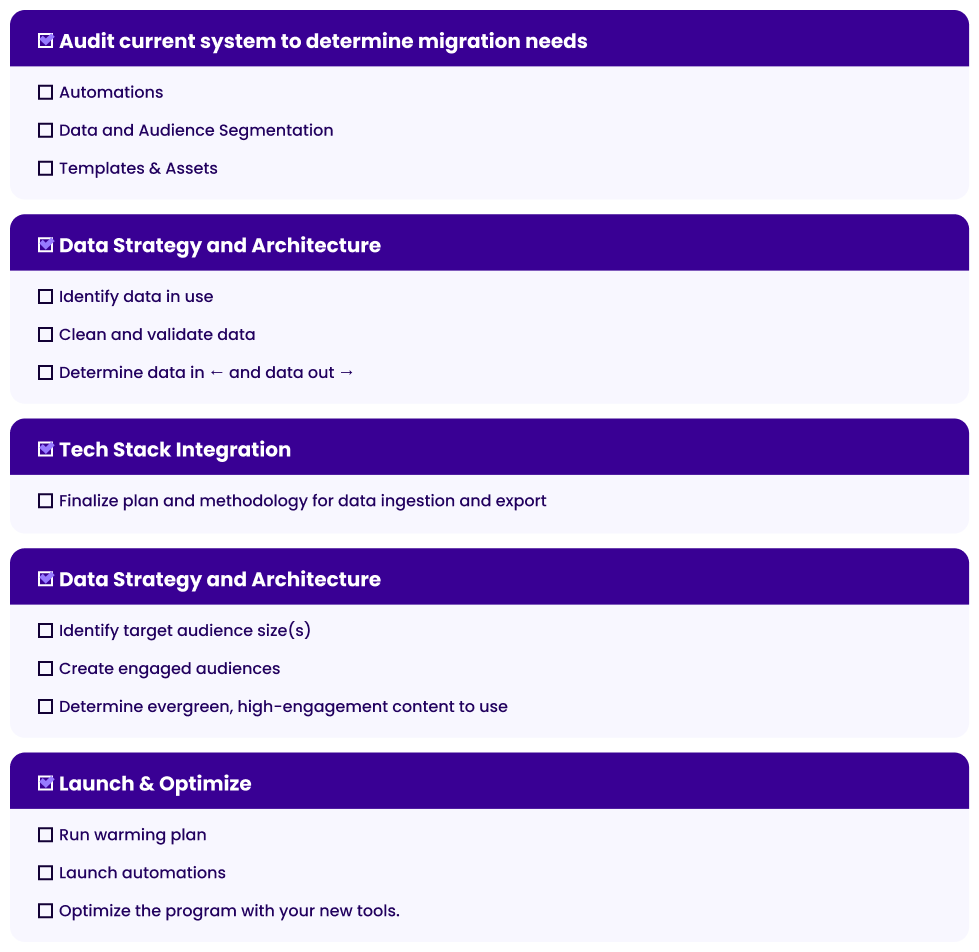
There are 5 main phases to an ESP Migration:
Let’s cover each step in more detail.
Before making the move, it is critical to perform a comprehensive documentation of your current ESP program. This allows you to identify and deprecate outdated workflows, stagnant audiences, or legacy triggers that are no longer driving results. Moving “messy” data or underperforming automations only carries old problems into a new environment.
Take a look at what is currently running in your system. Determine what items are needed and should be moving, as well as how they are triggered and any key data that powers your messaging. If any A/B tests are running, determine winners so that a clean transition can occur.
Based on migration timing, it’s also best to set a cutoff date for any changes in your legacy system to ensure parity when migrating. This is also a good opportunity to set priority order for determining key pieces of your marketing strategy (such as welcome series or abandon messaging) that are key revenue drivers and should be migrated first.
Review your standard segmentation for sending and identify any filters needed for automations. This is also a good time to identify if any data is no longer needed or duplicative.
Also review any event and profile data that is being piped into your system and determine what pieces are needed to power automations or other information within your system. Knowing how that data is being sourced and how it is currently being piped into your ESP will help you determine what is the source of truth and what integrations need to be leveraged for your new ESP.
Finally, assess your creative needs for your program. Identify message templates and any building blocks such as headers and footers that are consistently used across assets. Audit your currently live messaging for out-of-date branding, as moving systems is an excellent time to unify branding to ensure consistency in your messaging.
Additionally, if you are currently using your legacy ESP for image hosting, those images will need to be migrated to your own asset management system or will need to be rehosted in your new ESP. Any content being moved will need to be audited for those links to ensure items are rehosted.
Now that key messaging has been identified, it’s time to analyze your data architecture. An ESP migration is a pivotal time to deeply reassess your data structure, ensuring consistency across systems and keeping data in sync throughout the transition.
Most ESPs divide data into two categories, real-time data (such as purchase events or onsite activity) and profile data (demographic data of a single contact). Create a list of necessary data, where it is sourced from, and document examples of the data’s format.
Every ESP has its own preferences for data formatting and ingestion, so determining any data transformation that needs to occur can help you ensure that data is able to be utilized in similar ways across systems.
Ensuring data integrity and cleanliness is another key part of ensuring a successful migration. The most crucial phase of a migration is the warming process that will establish the reputation of your new sending system. By cleaning our bad contacts before they ever make it into your new ESP, you can help get ahead of any deliverability issues by reducing the risk that these bad contacts impact your warming, which can cause issues and extend the migration timeline if not properly mitigated.
Validating your data can also help you determine the accuracy and consistency of any data fields. Are there duplicative fields that can be removed or combined in the new system? Is demographic data such as country being brought in a consistent format? If it is possible to standardize this information, it can help simplify your data schema and improve the accuracy of your segmentation, reducing the risk that data is missed.
ESPs rarely exist in isolation anymore, so understanding the broader marketing ecosystem around your system can help you plan what integrations need to be in place to fully power your messaging.
Identify what data needs to be brought into the system to power your messaging and where it comes from. Do these sources have out-of-the-box integrations with your new ESP, or will additional engineering assistance be needed?
Potential data sources:
Likewise, ESPs can be a crucial part of feeding your broader marketing ecosystem with engagement and first party data.
These destinations can include:
Download our Digital Ads Benchmark Report for a deep-dive on data across Google, Meta, Amazon, and more.

Beyond the cleanup, migrating requires reestablishing your sending reputation—a key factor in keeping your messaging in the inbox and out of the spam folder.
Moving ESP platforms also means that you are migrating you sending IP and infrastructure. This is a crucial part in ensuring that your program is able to transition to your new ESP smoothly. A negative reputation can risk your emails landing in the spam folder, or never even making it to users at all.
With this in mind, having a solid warming plan is key to getting your reputation in a strong position from the first send.
The warming process starts with identifying your target warmed audience. This should be your average send size that is sent to on a consistent basis. If you are a daily sender, this may be your average daily send volume. If your cadence varies more widely, your largest send size over a week or month may be a better target.
Next, determine your engaged audience sizes. Because IP reputation is built on consumer engagement with your messaging, you want to be targeting your most engaged audiences first, and expand your list from there until you have reached your target audience size.
It is also recommended to set up tools like Google Postmaster and Microsoft SNDS in order to monitor your reputation, particularly for these key inbox services.
Finally, you will want to select high-engagement content to make up your warming messaging. Select evergreen content that does not need to be sent at a specific time, as you may need to make pivots to your warming schedule based on how your reputation is developing. Bumps in the road during warming is incredibly common, so having contingency plans for backup content is always helpful.
Once your IP is warmed, it is best practice to send out of your new system. Throughout the warming process, you should also be launching automations, which can add additional volume during the later phases of warming, and sunsetting messaging from your legacy system.
As you reach parity in your new system, you can start taking advantage of new tools and features in your new system to begin to optimize your program and create an even more personalized experience for your customer.
An ESP Migration is a large-scale change and requires a lot of knowledge and planning to accomplish. Working with an agency that specializes in ESP migration services lets you take advantage of a team that regularly assists in migrations. This grants you unique access to expert advice to ensure your project goes smoothly. Depending on your team’s needs you can get ESP migration consulting for everything from helping audit your systems, determining your data schema for your next system, planning warming, and assistance in moving content, data and logic from your current system to your next.
Tinuiti’s migration services have worked across a variety of ESPs, giving us the unique position of being able to help your team get up to speed and comfortable with your new system, as well as being able to help your team assess what system might best fit your unique needs.
Get strategies that integrate channels, create seamless experiences, and resonate across the customer journey.

Each ESP has its own mechanisms and tools for automations and logic. During your audit of automations, it’s best to document the overall logic of your automations, so you can best translate the functionality of an automation from one system to another. Taking note of any data points needed and how they are used can also help you identify how data needs to be implemented in the new system to maintain functionality.
Moving ESP systems requires you to set up a new subdomain and new IP addresses as your sending identity. This resets your sending reputation, so you need to re-establish your reputation with ISPs. This process of warming is a gradual increase in sending to prove to ISPs that you are a valid sender and are sending mail wanted by your recipients.
Historical click and open data usually stays in the old system, so it’s best to do final exports of any legacy data before system end of life. Any tracking of new sends must be set up and validated in the new system to ensure parity and consistency of conversion data.